
 Martal
 Technology
 Education and training
 Web Development and UI / UX
 Healthcare/Medical
 Logistics and Supply Chain
 Information Technology
 Insuretech and Financial Services
 Marketplaces
 Software Development
 E-commerce and retail
 AI and Machine Learning
 Energy and Solar
 Manufacturing
 Security and Surveillance
 Digital Marketing Agency
 Transportation
 MSP
MSP
 Telecom
 B2B SaaS
 Cybersecurity
 HR tech
 Fintech
 Cleantech
 Consulting
Lead Lists in 2026: How to Build, Buy, and Use Them Without Burning Pipeline
Major Takeaways: Lead Lists
A lead list is a structured dataset of contacts at companies that match your Ideal Customer Profile, used as the starting point for outbound outreach. A prospect list is the same thing, narrowed further — accounts your team has actively decided to pursue. The terms get used interchangeably in most B2B conversations, but the distinction matters for reporting and qualification.
Sometimes. It depends on whether you can verify, enrich, and refresh the data fast enough to outrun the decay curve. HubSpot’s research puts the average B2B data decay rate at 2.1% per month, which means a static one-time purchase loses value the moment it lands in your CRM. (1)
Building your own list gives you control and freshness but consumes the most internal time. Buying a list is fastest but only works if you have the operational discipline to verify, segment, and work it on a strict cadence. Outsourcing to an outbound partner like Martal gives you continuously refreshed targeting, omnichannel execution, and qualified leads delivered to your team — with no list-building work on your side.
Active prospect lists should be verified at least quarterly — and continuously for high-priority accounts. Industry guidance puts the cost-effective baseline at monthly email verification, quarterly enrichment, and continuous signal monitoring for accounts in active outreach.
Treating the list as the campaign. The list is the input. The campaign is sequencing, targeting, messaging, channel coordination, and follow-up. Teams that underinvest in the second half of that equation almost always blame the list when the real problem was the operating model around it.
Yes — but compliance varies sharply by region. Cold email is largely permitted in the US under CAN-SPAM, restricted under Canada’s CASL, and tightly governed in the EU and UK by GDPR. Cold calling has its own rules under the TCPA in the US. We’ll cover region-by-region requirements later in this guide.
Introduction
Most teams reach for a lead list when the pipeline gets thin. Then the bounces start, the deliverability drops, and the SDRs spend their week chasing contacts who left their company eight months ago. The list wasn’t the problem — the operating model around it was.
According to HubSpot, B2B contact data decays at roughly 2.1% per month (1) which compounds to about 22.5% annually. A list bought in January is materially different by April, and meaningfully degraded by year-end. That changes how lead lists should be sourced, refreshed, and worked.
This guide is built for sales and marketing leaders deciding whether to buy a list, build one in-house, or run outbound through a managed partner. We cover when each approach makes sense, how to evaluate a vendor, what compliance actually requires in 2026, and how to measure whether the spend is paying off.
We’ve spent 16+ years running outbound campaigns for B2B teams across SaaS, manufacturing, fintech, telecom, and more. The patterns repeat. Teams that succeed with lead data treat it as a living system. Teams that fail treat it as a one-time purchase. We wrote this guide to help buyers tell the difference before the budget is gone.
When a Lead List Actually Makes Sense
Buying lead lists has a complicated reputation in B2B sales. A B2B EdTech SaaS marketer on Quora described it as “a tactic to avoid” (2) and they have a point, but only some of the time. The honest answer is that purchased lists work in specific situations and fail in others. Here’s how we frame it for clients evaluating the option:
Speed when you genuinely have none
Launching into a new vertical or geography where you have no inbound presence and no warm network is the strongest case for an external list. Inbound takes months to compound. Outbound on a verified list can put your team in front of decision-makers in weeks.
Market validation before bigger investment
A focused 500-1,000-contact list inside a tightly defined segment is a low-risk way to test whether a new ICP responds to your messaging at all. The signal you’re looking for is reply rate and qualification rate — not closed deals on a sample that small. Most experienced teams treat the first batch of contacts from any new list as a stress test for both the list and the messaging, (9) then adjust before scaling.
Filling a temporary capacity gap
If your in-house SDR team is short-staffed or your demand-gen function is rebuilding, a verified list can buy you time. The risk is treating that bridge as a long-term solution. A purchased list won’t replace a real outbound system — it just shortens the runway.
Layering data onto your existing motion
Most successful B2B teams don’t choose between purchased data and organic generation. They layer them. A list becomes the seed; intent signals, technographic enrichment, and targeted research turn it into a real prospecting motion. We’ll cover what that stack looks like later in this guide.
Where lead lists fall apart: A list bought in isolation, dumped into a CRM, and emailed at scale is one of the fastest ways to damage sender reputation. Hard bounce rates above 2% start hurting deliverability, and rates above 5% put your domain at risk of being blacklisted. (3) That’s the operating risk teams underestimate.
Why Lead List Quality Matters More Than Volume
The most common mistake we see in outbound is treating list size as a proxy for list quality. A 50,000-contact list with stale records is not a pipeline opportunity. It’s a deliverability liability. The data backs this up:
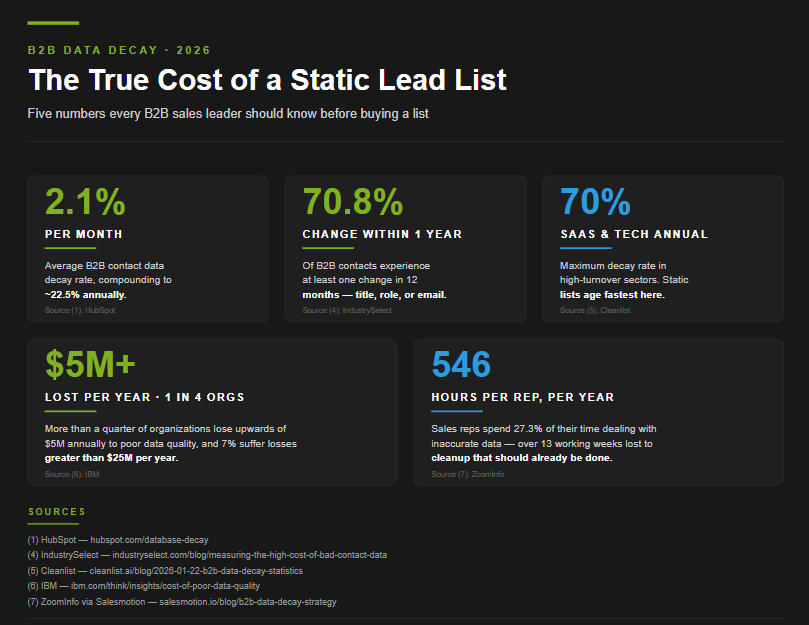
- HubSpot research puts B2B contact data decay at 2.1% per month, compounding to roughly 22.5% per year (1). A 10,000-contact list bought today loses about 2,250 valid records over the next 12 months without any action on your side.
- A study tracking 1,000 business contacts found that 70.8% experienced one or more changes within 12 months (4), job title shifts, company moves, or contact information updates.
- In high-turnover industries like SaaS and tech startups, decay can run as high as 70% annually (5), with 15-20% of professionals changing jobs each year.
- – IBM estimates that more than a quarter of organizations lose upwards of USD 5 million annually because of poor data quality, and 7% suffer losses greater than USD 25 million (6).
- ZoomInfo reports that sales reps spend 27.3% of their time dealing with inaccurate data (7), roughly 546 hours per rep per year, or more than 13 full working weeks lost to data hygiene work that should already be done.
Those numbers are sobering, but the practical takeaway is straightforward: a lead list is not a static asset. It’s a snapshot of a moving target. The teams that get the most out of purchased data are the ones that build refresh cycles, verification workflows, and signal monitoring into the operating model from day one — not the ones that buy biggest.
Why decay rates vary so much by industry
Decay isn’t uniform. Different verticals churn at radically different rates, and the team buying the list usually finds out the hard way. Below is a quick reference based on patterns we’ve seen across 16+ years of outbound work and what current industry research shows:
How to Make a Lead List Actually Work
The list is the input. The campaign is the system around it. Most teams that buy data without a workable operating model end up blaming the vendor for results their own process produced. Here’s what the process should look like once a list lands in your environment.
Step 1 — Build a clean integration layer
Every purchased or built list needs its own dedicated source designation in your CRM. Tag it. Segment it. Keep it isolated from your inbound and partnership records. This separation isn’t cosmetic — it’s the only way to measure list performance honestly. If purchased data sits in the same pool as your warm pipeline, your win rates will look better than they are and your data quality issues will hide inside the average.
Set hygiene rules from day one. Hard bounces leave the database immediately. Soft bounces get flagged for re-verification before the next send. Records that haven’t been touched in 90 days get re-enriched or removed.
Step 2 — Enrich beyond contact data
Raw contact info — name, title, email, company — is the floor, not the ceiling. The teams that consistently get above-average reply rates layer in:
- Firmographic data like industry, firmographic data, employee count, revenue band, geography
- Technographic data showing what software the prospect’s company uses (especially when displacement is part of your sales motion)
- Trigger events like funding rounds, leadership changes, hiring surges, or recent product launches
- Intent signals that indicate active research in your category
This is where most “tools of the trade” lists in B2B blogs go wrong — they recommend stacking three or four point solutions to do the work of one integrated platform. A handful of separate tools can do the job, but the coordination overhead alone often costs more than the gains in data quality. Whether you stitch tools together or use a single platform, the goal is the same: reach a real buyer with context, not a stale email with a generic pitch.
Step 3 — Segment with real buying patterns in mind
Generic segmentation by industry and company size is table stakes. The teams getting outsized reply rates segment further:
- By buying signal proximity — accounts in active research vs. accounts in steady state
- By organizational maturity — fast-growing scaleups have different pain than established enterprises, and the messaging needs to reflect that
- By tech environment — what your prospect already uses tells you whether your pitch is “replace this” or “fill this gap”
- By role intent — a CFO and a VP of Sales at the same company want different things from the same product, even when their ideal customer profile is technically identical.
Step 4 — Run a dedicated cadence per segment
One sequence is not a strategy. Each segment needs its own messaging, channel mix, and follow-up rhythm. The reason this matters: a CRO at a mid-market SaaS company on a procurement timeline behaves nothing like a head of operations at a manufacturer running a year-long evaluation. Same product, same vendor, completely different sequence design.
Real-world result: Forerunner Technologies
Forerunner is a US-based telecom equipment provider competing in a saturated market with long sales cycles. Generic outbound was getting them nowhere. We built a segmented campaign structure that targeted decision-makers across IT, telecom procurement, and operations leadership separately, with messaging tuned to each role’s specific buying triggers.
The result over the partnership: 7,000 prospects engaged per month, generating an average of 22 SQLs per month and consistent pipeline in a competitive telecom market. The shift wasn’t a bigger list — it was a smarter one, broken down to match how the buyers actually evaluated the category. Read the full case study for the complete breakdown.
That’s the pattern teams underestimate. The lift comes from segmentation discipline, not data volume.
Build, Buy, or Outsource: Choosing the Right Lead List Path
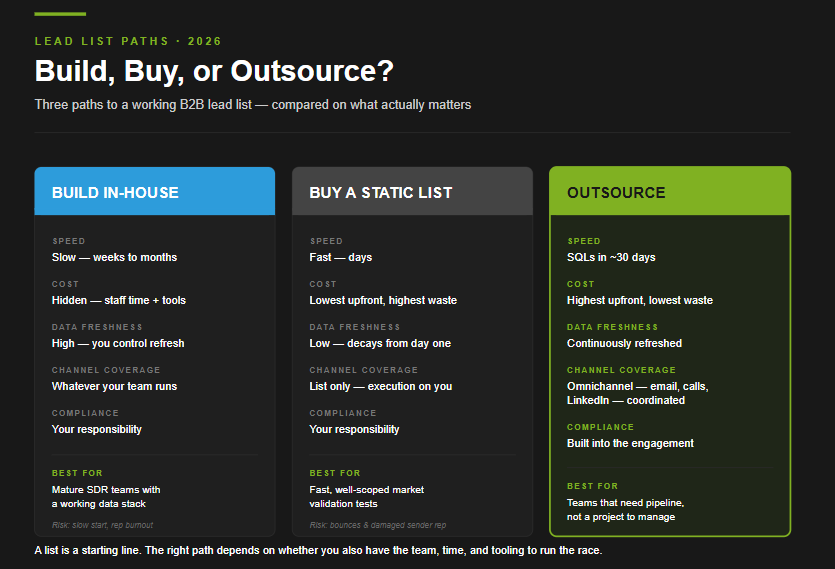
The most common version of this question, “should I buy a lead list or build one myself?” leaves out a third option that often outperforms both: outsourcing lead generation to a managed partner. The right path depends on what you actually have in-house: time, headcount, tooling, and the operational discipline to keep a list alive once it lands.
Here’s how the three approaches compare for a B2B team:
Building a lead list in-house
The case for building yourself, and where it tends to break down:
- What you gain: Full control over data quality, segmentation logic, and the institutional knowledge your team accumulates over time. Every prospect researched, every account tagged, every disqualification flagged stays in your environment and compounds.
- The hidden cost: List-building is its own discipline — defined ICP criteria, multiple data sources stitched into a waterfall, email and phone verification workflows, and ongoing refresh cadences. ZoomInfo’s research finds sales reps spend 27.3% of their time on inaccurate data (7), roughly 546 hours per rep per year. When that time is internalized as “list-building,” it disappears from the cost equation but the productivity drag is real.
- What separates teams that succeed: They treat data hygiene as a dedicated function, not a sales rep side task. They build refresh SLAs, assign ownership, and invest in tooling that handles the verification load.
- Best fit: Mature B2B teams with experienced SDRs, a working data stack, a clear ICP refined through closed-won analysis, and the patience to absorb a slower ramp in exchange for tighter control.
- Where it works less well: Teams under pipeline pressure, lean operations, or companies expanding into unfamiliar markets where the institutional knowledge doesn’t yet exist.
Buying a static lead list
Fastest path to contact data — and the riskiest if the operational follow-through isn’t in place:
- The freshness problem: At HubSpot’s benchmark of 2.1% monthly decay (1), the data that looks fresh on day one has already started losing accuracy by week two. The usable life of a purchased list is shorter than most buyers expect.
- What separates the teams that succeed: It isn’t the vendor — it’s the workflow they apply afterward. The successful pattern: verify every email through a dedicated tool before any sequence runs, segment by ICP tier and signal proximity rather than blasting one cadence at everyone, throttle initial send volume to protect domain reputation, and pull hard bounces immediately.
- The week-six failure pattern: Teams that skip the workflow above tend to discover the cost in week six — reply rates collapse, the new domain is flagged, and the team blames the data when the real problem was the operating model.
- The compliance you inherit: When you buy a list, you inherit the vendor’s compliance posture. If their data sourcing is questionable in a region like the EU or Canada, your team is the one running the cold campaign — not theirs. We see this most often when vendors sell US-priced, EU-sourced data without flagging the regulatory implications.
- Best fit: Short-term, well-scoped tests — validating a new ICP, gauging demand in a new geography, or filling a temporary capacity gap with clear guardrails.
- Where it works less well: As a standalone pipeline strategy. The operational overhead of making a static list usable scales linearly with list size, while the data quality decays on its own clock.
Outsourcing to a managed partner
A different conversation than buying data. Buying data delivers a list. Outsourcing delivers pipeline:
- What you actually get: Qualified meetings, sequenced follow-up, omnichannel coordination across cold email, cold calling, and LinkedIn, and the operational layer that makes the data productive. The right partner doesn’t sell you a spreadsheet — they run the campaign.
- What we see across 16+ years of outbound: Clients who outsource don’t want to manage a tool, debug a sequence, or maintain a database. They want SQLs and booked meetings on a predictable cadence. The model that delivers combines continuously refreshed data, senior SDRs who understand the buying motion, omnichannel execution, and built-in compliance handling for the regions being targeted.
- The trade-offs, named honestly: Highest upfront cost of the three paths. Choosing the wrong partner can waste a quarter. Clients give up some direct control over each conversation in exchange for the operational lift. For mature in-house teams with tight ICP discipline, that trade-off may not pencil out.
- Best fit: Teams that need pipeline as the deliverable — not contact data to work, not a tool to manage, not a project to staff. Also strong fit for companies with long sales cycles, complex buying committees, or vertical-specific compliance requirements where regional and industry experience can compress months of in-house ramp into weeks.
- Where to start your evaluation: Our guide to the top lead generation companies walks through how to evaluate fit if you’re comparing partners in this category.
What this looks like in practice
For Awin, a global affiliate marketing platform, the question wasn’t whether to build a list — it was whether to expand outbound capacity without adding headcount. Over the engagement, we delivered 1,204 verified leads, 1,001 MQLs, 100 SQLs, and 74 booked meetings. As their Sales Manager described it, the team operated as an effective extension of their internal function. Read the full case study for the complete breakdown.
That’s the difference between a list and a system. A list is a starting line. A managed engagement is the entire race.
How to Build a Lead List From Scratch
If the in-house path is the right call for your team, here’s the build sequence that actually works. We’ve watched dozens of teams try to shortcut these steps and watched the same patterns surface every time — wrong contacts, wasted SDR hours, and pipeline that looks busy but doesn’t convert. The difference between a working list and a CSV that ages in someone’s downloads folder comes down to discipline at each stage.
Step 1 — Define the ICP before you touch a database
Most lead lists fail at the first step. Teams skip ICP refinement because it feels slow, then build a list against assumptions instead of evidence. The fastest way to short-circuit this:
- Pull your last 12-24 months of closed-won deals. Look at industry, company size, geography, tech stack, role of the champion, and how they found you originally. Patterns surface fast.
- Cross-reference with closed-lost. The deals you almost won but didn’t are often more instructive than the wins. They show where your message lands but the fit is off.
- Define exclusion criteria as carefully as inclusion criteria. A list filtered by what disqualifies an account is usually higher-quality than a list defined by what qualifies one.
- Document the ideal customer profile in writing. If your SDRs and AEs can’t repeat it back from memory, it isn’t real yet.
Step 2 — Choose your data source stack
No single B2B database covers every contact accurately across every geography and industry. Teams that succeed at building lists in-house usually run a layered approach rather than depending on one provider:
- A primary contact database — Apollo, ZoomInfo, UpLead, or similar — for baseline coverage.
- A waterfall enrichment layer that runs records through additional providers when the primary comes up short on emails or phone numbers. This is how teams hit 80%+ match rates instead of the 30-60% a single provider typically delivers.
- Technographic and intent layers for deeper context — what the prospect’s company runs, what they’re researching, what’s changing inside the business.
- Trigger event sources for timing — funding rounds, leadership changes, hiring surges, competitive losses.
The trade-off is real: more sources mean better data and higher tooling costs. Teams that try to do this on one cheap subscription usually end up with a list that looks complete but bounces aggressively in the first send. Plan the stack for the long-term cost before signing the first contract.
Step 3 — Verify before you send
Verification is non-negotiable. The cost of skipping it is your sender domain reputation, which takes months to rebuild after damage:
- Run every email through a dedicated verification tool (NeverBounce, ZeroBounce, or equivalent) before adding records to a sending sequence.
- Pay attention to catch-all domains. They can’t be reliably verified without an actual send attempt — these need to be quarantined or sent to first, in low volume, before going into a wider sequence.
- Cross-check on LinkedIn. A spot-check of 3-5 records per batch against current LinkedIn profiles catches the contacts who left the company since the database was last refreshed.
- Verify direct dials separately. Phone numbers decay differently than emails — re-verification matters more for cold calling sequences than for cold email.
Step 4 — Segment before you message
A list is not a campaign. The mistake teams make most often is moving from “verified records” to “send” without doing the segmentation work that makes the messaging land. Effective segmentation looks like:
- By ICP tier — Tier 1 (perfect-fit accounts that get the highest-touch sequence), Tier 2 (good-fit accounts that get the standard sequence), Tier 3 (acceptable-fit accounts that get a lighter touch).
- By role — a CFO and a VP of Sales at the same company need different messaging, even when the underlying value prop is identical.
- By signal proximity — accounts showing active research, recent funding, or hiring surges go into a faster cadence than accounts in steady state.
- By industry context — a manufacturing buyer evaluates differently than a SaaS buyer; the segmentation should reflect how each vertical actually buys.
Step 5 — Build a refresh cadence
The list isn’t done when you finish building it. It’s done when you’ve defined how it stays alive:
- Active prospect records in current outreach — verify monthly.
- Working pipeline contacts — re-enrich quarterly with updated firmographic and signal data.
- Aged records sitting unworked for 90+ days — re-verify before re-engagement, or remove.
- Hard bounces — pull immediately. Soft bounces — flag for re-verification before the next send.
Industry guidance puts the cost-effective baseline at monthly email verification, quarterly enrichment, and continuous signal monitoring (7) for accounts in active outreach. Teams that follow that cadence keep their database at 90%+ accuracy without manual research overhead. Teams that don’t tend to discover their list quality has eroded only when bounce rates climb high enough to threaten deliverability.
Common mistakes that break in-house lists
The patterns we see most often when in-house list-building goes sideways:
- One sequence for the entire list. No segmentation, no role differentiation, just volume into a single cadence. This is the fastest way to destroy a sender domain and a brand reputation simultaneously.
- No exclusion logic. Every record that matches surface-level filters gets included, regardless of whether the team has worked the account before, lost the account previously, or has an existing customer relationship.
- Verification skipped to save time. The 30 minutes saved on verification costs weeks of recovery on deliverability when a list with 8% bounce rate hits the spam folder.
- List ownership unclear. When nobody owns the data hygiene process, it doesn’t happen. Successful in-house programs name a single function — RevOps, marketing ops, or a dedicated data analyst — as the accountable owner.
- Treating the list as a one-time project. A built list isn’t a deliverable. It’s an ongoing operation. The teams that succeed budget for the maintenance cycle from day one.
How to Evaluate a Lead List Provider
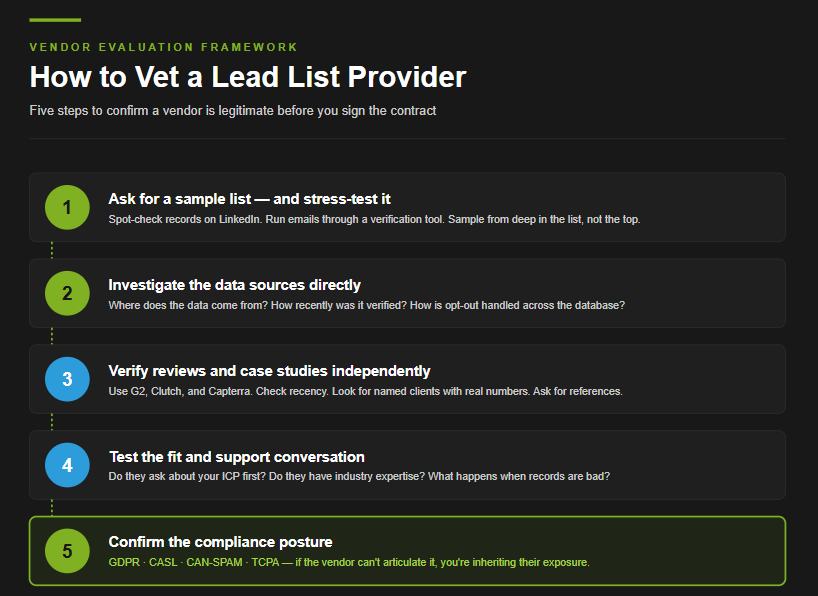
One of the most common questions we hear from teams who’ve been burned by a list purchase is the same one buyers ask before their first one: how do I know if this vendor is legitimate? The honest answer is that you can usually tell within an hour of due diligence — if you know what to look for. Here’s the framework we recommend buyers use, whether they’re evaluating a data provider, a list broker, or a managed lead generation partner:
Step 1 — Ask for a sample list before paying
Any reputable provider will send a sample. The ones that won’t are usually the ones with the most to hide. What to do with the sample once you have it:
- Spot-check 5-10 records on LinkedIn. Does the title match? Is the person still at the company? Does the company still exist?
- Run the emails through a verification tool. A clean sample should hit 95%+ verified. Anything below 90% is a red flag — and the broader paid list will be worse, not better.
- Pick the records the vendor probably didn’t expect you to check. The first 5 records in any sample are usually the cleanest. Sample from positions 50, 100, 200 to see what the average looks like.
Step 2 — Investigate the data sources
Where the data comes from determines whether you can legally use it and how fresh it actually is. Questions to ask directly:
- Where is this data sourced from? Web scraping, opt-in databases, partner data exchanges, and public records all carry different compliance profiles. A vendor who can’t or won’t explain their sourcing is one to avoid.
- How recently was each record verified? “Updated quarterly” and “verified at point of delivery” are very different products at very different price points.
- What’s the refresh cadence? A list that’s verified monthly is structurally different from one verified annually — and the price difference rarely matches the quality difference.
- How is opt-out handled? Reputable vendors maintain suppression lists and respect opt-out requests across their entire database. Vendors who don’t are exposing their buyers to compliance risk.
Step 3 — Verify reviews and case studies independently
Vendor websites are marketing assets, not evidence. The independent signal:
- Look for reviews on G2, Clutch, and Capterra — platforms where reviews are tied to verified user accounts, not anonymous submissions on the vendor’s own site.
- Check recency. A vendor with strong reviews from three years ago and nothing since is often a vendor that’s coasting on past reputation.
- Look for case studies with named clients and real numbers. Anonymized case studies aren’t necessarily a problem — some clients require it — but a vendor whose entire portfolio is anonymous and whose results are vague is signaling weakness.
- Ask for client references. Reputable vendors will connect you with current customers in similar industries. Vendors who refuse usually have a reason.
Step 4 — Test the support and fit conversation
How a vendor handles the buying conversation usually predicts how they’ll handle the campaign:
- Do they ask about your ICP first? Vendors who push volume before they understand your fit are selling commodity data, not a solution.
- Do they have industry expertise? A vendor who’s never worked your vertical will sell you the same data they sell everyone else. Industry-specific experience matters more than database size.
- What does the support model look like? Self-serve database access is fine if your team has the discipline to work the data. If you need help with segmentation, messaging, or campaign execution, confirm that’s part of the package — not an upsell.
- What happens when records are bad? Refund policies, replacement guarantees, and bounce credits separate vendors who stand behind their data from vendors who don’t.
Step 5 — Confirm the compliance posture
This is where most lead list buyers get exposed. Compliance shouldn’t be an afterthought:
- GDPR posture for EU/UK targets — does the vendor have a documented lawful basis for processing the data they’re selling you?
- CASL posture for Canadian targets — does the vendor maintain proper consent records, or are they selling cold data into a strict-consent regime?
- CAN-SPAM compliance for US email — table stakes, but worth confirming the suppression list management and opt-out handling.
- TCPA compliance for US calling/texting — especially important if your sequences include phone or SMS outreach.
If a vendor can’t articulate their compliance posture in plain language, you’re inheriting their exposure. We cover the regional rules in detail in the next section.
One thing buyers consistently miss: regional channel restrictions
The compliance posture conversation matters most when the answer determines which channels you can actually use in each region. This is where most US-based buyers get caught off guard:
- United States targets — Cold email, cold calling, and LinkedIn outreach all available under standard CAN-SPAM and TCPA compliance.
- EU and UK targets — Cold email is heavily restricted under GDPR. Reputable B2B outreach into these markets typically uses cold calling and LinkedIn only, with email reserved for prospects who’ve opted in or otherwise established a lawful basis.
- Canadian targets — CASL is strict. Cold email into Canadian companies generally isn’t a working outbound channel without express or implied consent. Cold calling and LinkedIn outreach remain viable.
- EU, UK, or Canadian companies targeting the US market — Full omnichannel applies because the campaign is reaching US buyers, not domestic buyers.
The implication for buyers: a vendor selling US-priced data into EU or Canadian targets without flagging the channel restriction is creating exposure for your team, not theirs. A vendor whose campaigns adapt by region — calling and LinkedIn only into EU/UK and Canada, full omnichannel into the US — is operating the way the regulation actually requires.
For our managed clients, this isn’t a checklist item, it’s the campaign architecture. Onshore teams in North America, Europe, and LATAM run regionally compliant outreach by default, which removes the legal exposure from the buyer’s side entirely.
The Lead List Tech Stack: What You Actually Need
Most teams that build outbound in-house end up running five or six tools that talk to each other through varying degrees of duct tape. Each tool does one job well; the integration overhead between them is where the cost hides. Here’s what each category does, why teams reach for separate tools, and where the consolidation pressure usually comes from.
Data and contact databases
The foundation of any lead list — verified contact data, firmographics, and the ability to filter by ICP criteria. Examples in this category include Clearbit and Lusha, among others. What to look for:
– Coverage depth in your target geographies and industries — match rates vary widely by vertical and region.
– Verification freshness — when each record was last validated, not when the database was last “updated.”
– Match rate transparency — what percentage of records will actually return an email or phone on enrichment.
Data enrichment and intelligence layers
Where contact databases give you names and emails, enrichment platforms add the context — technographic data (what software the company runs), trigger events (funding, hiring, leadership changes), and intent signals (active research). For most B2B teams, enrichment is the difference between a list that looks complete and one that’s actually ready for outreach.
Email verification tools
Verification is non-negotiable before any cold sequence runs. Tools like NeverBounce and ZeroBounce catch the records that have gone bad since the database last refreshed, protecting your sender domain reputation. The cost of skipping this layer is typically discovered around week six, when bounce rates climb and deliverability collapses across every campaign on the domain.
Outreach and sequencing platforms
Once your data is clean, you need a system to actually run the campaigns — sequence emails, coordinate LinkedIn outreach, manage follow-up logic, and track engagement. Outreach.io and SalesLoft are common picks here. The category is mature, but most platforms in it focus on email and require separate integrations or manual coordination for cold calling and LinkedIn.
Reporting, analytics, and signal monitoring
Often the last layer teams add, sometimes the first one to break. Reply rates, meeting bookings, channel performance, and signal-based prioritization need to feed back into the campaign loop continuously. Most teams stitch this together from CRM dashboards, the outreach tool’s native reporting, and a separate intent or signal monitoring tool — which is where the data fragmentation usually shows up.
Where the integrated approach wins
The five categories above represent the typical lead list tech stack: a database, an enrichment layer, a verification tool, a sequencing platform, and a reporting layer. Running them well as separate tools is possible — but the coordination overhead is real. Each integration is a potential failure point. Each tool has its own pricing tier, its own support contract, and its own quirks that the team has to learn. The total cost of ownership is rarely what the per-seat pricing suggests.
This is the gap Martal’s AI SDR Platform was built to close. The platform combines:
- A B2B contact database with 300M+ verified contacts across 24M+ company accounts, continuously enriched with 1,500+ data fields per company.
- Real-time intent signals monitoring 10M+ buying-readiness events — funding, hiring, technology adoption, content engagement.
- AI-powered outreach that drafts and personalizes sequences based on prospect role, industry, tech stack, and recent activity.
- Omnichannel orchestration across email, LinkedIn, and phone — coordinated, not parallel, so prospects experience a unified outreach experience.
- Built-in deliverability infrastructure including domain warm-up, sending rotation, and inbox placement monitoring.
- Compliance built in — SOC II, GDPR, and CAN-SPAM standards built into the infrastructure rather than bolted on after.
The platform handles all five categories above as one system rather than five integrations, which removes most of the coordination overhead and shrinks the time-to-first-campaign from weeks to under 30 minutes.
For teams running outbound in-house, this is the consolidation path. For teams that want the platform plus the senior SDR execution layer on top, our managed service runs on the same infrastructure with Martal’s onshore Sales Executives operating the campaigns end-to-end.
Measuring Whether Your Lead List Is Actually Working
The metrics that matter for a lead list aren’t the ones most teams report on. Open rates and contact volume look great in dashboards but tell you almost nothing about whether the list is producing pipeline. The numbers below are what we actually watch for clients — and the rough benchmark ranges to anchor against.
The metrics that signal a working list
- Reply rate. The first real signal. Healthy B2B cold email reply rates typically land between 1-5%, with 3%+ being a strong outcome. Industry research from Mailshake reports cold email reply rates averaging around 8.5% (8) across high-performing campaigns, though this skews toward heavily personalized outreach. Reply rates below 1% almost always point to either bad data or messaging that’s missing the audience.
- Bounce rate. The early warning system. Hard bounces above 2% start hurting deliverability; rates above 5% put your sending domain at risk. A clean, well-verified list should hold under 2% throughout the campaign cycle.
- Meeting conversion rate. The honest measure. Of the prospects who reply, what percentage convert into a booked meeting? In healthy B2B campaigns, this typically lands between 10-30% of replies — meaning most replies aren’t meetings, and that’s normal. The reps’ qualification discipline matters as much as the data quality here.
- SQL conversion rate. The ultimate quality signal. Of the meetings booked, what percentage convert into a Sales Qualified Lead — a prospect with real authority and stated interest in the next step? In our managed campaigns, this typically lands between 30-60%, depending on the vertical and how tightly the ICP is defined.
- Pipeline influence and revenue impact. The end-of-cycle measurement. Every list ultimately gets judged by the pipeline it produced and the deals that closed from it. The lag between cold contact and closed deal varies sharply by industry — short for transactional B2B, long for enterprise — but the correlation back to list quality is usually clear in retrospect.
Vanity metrics to deprioritize
The numbers that feel productive but rarely predict pipeline:
- Email open rate. Apple Mail Privacy Protection broke this metric in 2021 and the noise has only compounded since. Industry data shows open rates averaging anywhere from 14-23%, (8) but the figure includes preview-pane opens, image-loader pings, and bot-induced opens that have nothing to do with human engagement.
- List size. Bigger isn’t better. A 1,000-record list with 95% verified accuracy is more valuable than a 10,000-record list at 70% accuracy. The teams that fixate on volume usually under-invest in segmentation.
- Sequence completion rate. “75% of contacts received all five emails” sounds like progress, but the underlying signal is usually that the early emails didn’t perform well enough to generate replies and pull the prospect out of the sequence.
Calculating real ROI on a lead list
True ROI on a lead list isn’t just the cost of the data divided by closed deals. The honest calculation includes:
- Direct cost of the list itself.
- Tooling cost for verification, enrichment, sequencing, and reporting layered on top of the raw data.
- SDR time to clean, segment, sequence, and work the list — at fully-loaded rep cost, not base salary.
- Opportunity cost when a damaged sender domain reduces deliverability across every other campaign on the same infrastructure.
- Average deal value and customer LTV for accounts that closed from the list.
- Sales cycle length from cold contact to closed-won — particularly important for comparing a fresh list against a well-worked one, where the second list typically converts faster.
The ROI calculation that gets most lead list buyers in trouble is the one that counts only the direct cost of the data and ignores the SDR time, the tooling stack, and the deliverability risk. Honest ROI is usually 2-5x lower than the back-of-envelope math suggests, which is why the build/buy/outsource trade-off pencils out differently than buyers expect.
For a faster way to model the math against your own pipeline assumptions, our ROI calculator lets you plug in deal size, conversion rates, and ramp expectations to see what an outsourced outbound engagement could return compared to a build-in-house or buy-a-list path.
Test small before you scale
The fastest way to learn whether a list is going to work is to run a contained test before committing the rest of the budget:
- Start with 500-1,000 contacts in a tightly defined segment.
- Run a single sequence with consistent messaging so the variable being tested is the data, not the copy.
- Track reply rate, bounce rate, and meeting conversion separately — each tells a different story about list quality.
- Wait at least 14 days before drawing conclusions. Reply curves stretch further than most teams expect.
If the contained test produces healthy reply rates and meeting conversion in line with the benchmarks above, the list is working. If reply rates are low but bounce rates are clean, the messaging is the issue. If bounce rates are high, the data is the issue. Each of these failure modes has a different fix — and confusing them is one of the most expensive mistakes teams make with purchased data.
Real-world result: Spice
Spice, a Canadian supply chain SaaS company, came to us looking to scale outbound into US enterprise accounts without expanding their internal team. The lift wasn’t volume for its own sake — it was a tightly segmented engagement that prioritized fit over reach. Over the partnership, we delivered 300+ MQLs and 60+ booked meetings, with reply rates and meeting conversion holding above category benchmarks throughout. The combination of senior SDR execution and continuously refreshed data is what kept the campaign performing month over month rather than spiking early and decaying.
Should You Buy a Lead List? A Decision Framework
The “should I buy a list?” question almost always hides a more useful one underneath: what does my team actually need to produce pipeline this quarter? The answer dictates the path. Here’s the framework we walk clients through when they’re trying to decide:
Buy a list if you have all five of these in place
- A clearly defined ICP validated against closed-won data, not assumptions.
- A bandwidth-ready SDR team with capacity to verify, segment, and sequence the list before any send goes out.
- A dedicated sending domain that won’t take down your primary domain if deliverability gets shaky.
- Compliance posture that matches the regions you’re targeting — particularly for EU, UK, and Canadian outreach.
- A clear test scope with success criteria defined before the budget is committed.
If any of those five are weak or missing, buying a list is likely to under-perform — not because the list is bad, but because the operational layer around it isn’t ready.
Build the list in-house if:
- You have a mature SDR team and a working data stack.
- You can absorb a slower ramp in exchange for tighter control.
- You have the institutional knowledge — or the patience to develop it — for the verticals you’re targeting.
- Data hygiene has a named owner in your organization.
Outsource to a managed partner if:
- Pipeline is the deliverable — not contact data, not a tool, not a project to staff.
- You’re entering new markets where regional and industry experience compresses the ramp.
- You need omnichannel execution across cold email, cold calling, and LinkedIn without managing five separate systems.
- Compliance varies across the regions you’re targeting and you want it built into the engagement, not added as a checklist on your side.
- You’re optimizing for time-to-pipeline rather than time-to-list.
The honest take after 16+ years
The teams we’ve watched succeed don’t pick one of these paths in isolation. They pick the one that fits the resources they actually have right now, build the operating model around it, and revisit the decision as the company scales. A startup validating ICP fit may buy a small list to test. A mid-market team rebuilding outbound may outsource for two quarters while internal hiring catches up. An enterprise team with a mature SDR org may keep building in-house and use a managed partner only for new market entry. The path doesn’t need to be permanent. It just needs to fit what your team can actually execute.
The right lead generation software and the right operating model matter more than the path itself. The teams that fail tend to be the ones that picked a path their team wasn’t equipped to run.
Working With Martal
If your team is weighing the build-buy-outsource decision and wants a faster path to qualified pipeline, this is where we come in.
Martal runs outbound campaigns for B2B teams across SaaS, manufacturing, fintech, telecom, energy, and 50+ other verticals. Trusted by 2,000+ B2B brands worldwide over 16+ years and #1 in Lead Generation on Clutch, our managed engagements combine senior onshore Sales Executives with our proprietary AI Sales Platform to handle every layer of the outbound motion: continuously refreshed contact data, omnichannel outreach across cold email, cold calling, and LinkedIn, qualification of replies into Sales Qualified Leads, and built-in regional compliance for the markets you’re targeting.
The deliverable isn’t a list. It’s pipeline — Sales Qualified Leads and booked meetings, delivered on a predictable cadence — typically beginning within 30 days of campaign launch.
For teams that want the platform without the managed execution layer, Martal’s AI SDR Platform puts the same data, signal monitoring, and omnichannel orchestration in your team’s hands — campaign live in under 30 minutes.
Book a consultation to walk through your ICP, current pipeline gaps, and what a Martal engagement could look like in your specific market.
References
FAQs: Lead Lists
Does it really pay to buy a lead list?
Sometimes — under specific conditions. A purchased list can pay back quickly if you have a clearly defined ICP, an SDR team with bandwidth to verify and segment the data before sending, a dedicated sending domain that won’t take down your primary, and a contained test scope. Without those four conditions, the operational follow-through tends to overwhelm the apparent cost savings, and most teams that buy lists in this state end up worse off than they started.
The honest answer: lists work when the operating model around them is ready. They underperform when they’re treated as a shortcut.
How much does a lead list cost?
Pricing varies dramatically by data quality, vendor reputation, and how the list is sold. Per-record pricing for B2B contact data typically ranges from a few cents per record on the low end (commodity data, low verification) to several dollars per record for premium, recently verified, intent-enriched contacts. Subscription-based platforms (UpLead, Apollo, ZoomInfo) tend to offer better unit economics than one-time list purchases, especially for teams running outbound continuously.
The number that matters more than the per-record cost is the cost-per-usable-record after verification, segmentation, and SDR time. That figure is typically 2-5x higher than the sticker price suggests.
Is it legal to buy a lead list?
Yes — but compliance varies sharply by region. In the United States, cold email is permitted under CAN-SPAM with proper opt-out handling and sender identification, and cold calling is governed by the TCPA and Do Not Call registry rules. In the EU and UK, cold email into purchased lists is heavily restricted under GDPR, and most reputable B2B operations rely on cold calling and LinkedIn outreach in those regions. In Canada, CASL is strict — cold email into Canadian companies generally isn’t viable without express or implied consent.
The compliance posture you inherit when you buy a list is the vendor’s, not yours — but the exposure for using the data is yours, not theirs. Verify the lawful basis before you buy.
How often should I refresh my lead list?
For active prospect records in current outreach, monthly email verification is the cost-effective baseline. Quarterly enrichment with updated firmographic and signal data keeps the list usable, and continuous signal monitoring matters most for high-priority accounts. HubSpot’s research puts B2B contact data decay at roughly 2.1% per month (1) meaning a list left untouched for a year has lost about 22.5% of its accuracy. The teams that follow a structured refresh cadence keep their database at 90%+ accuracy without the manual research overhead.
What’s the difference between a lead list and a prospect list?
A lead list is a structured dataset of contacts at companies that match your ICP — used as the starting point for outbound outreach. A prospect list is the same thing, narrowed further: accounts your team has actively decided to pursue. The terms get used interchangeably in most B2B conversations, but the distinction matters for reporting and qualification. A lead list is the pool. A prospect list is the priority cut from the pool. Treating them as identical is one of the reasons SDR conversion reporting often misleads.
Why do my purchased lead lists have such high bounce rates?
Three causes account for the majority of high bounce rates on purchased lists:
– Stale data. The list was verified months ago, and the natural data decay rate of 2.1% per month has accumulated. A six-month-old list has lost roughly 12% accuracy without anyone touching it.
– Catch-all domains. Many enterprise companies use catch-all email configurations that accept any address at the domain. Verification tools mark these as “valid” but they often deliver to no real inbox, producing soft or hard bounces in production.
– Vendor data quality issues. Some providers source data through aggressive scraping with limited verification. The list looks complete on delivery but degrades aggressively the moment outreach starts.
The fix isn’t usually a different vendor — it’s verifying every record through a dedicated tool before sending, throttling initial send volume to protect domain reputation, and pulling hard bounces immediately rather than letting them accumulate.